



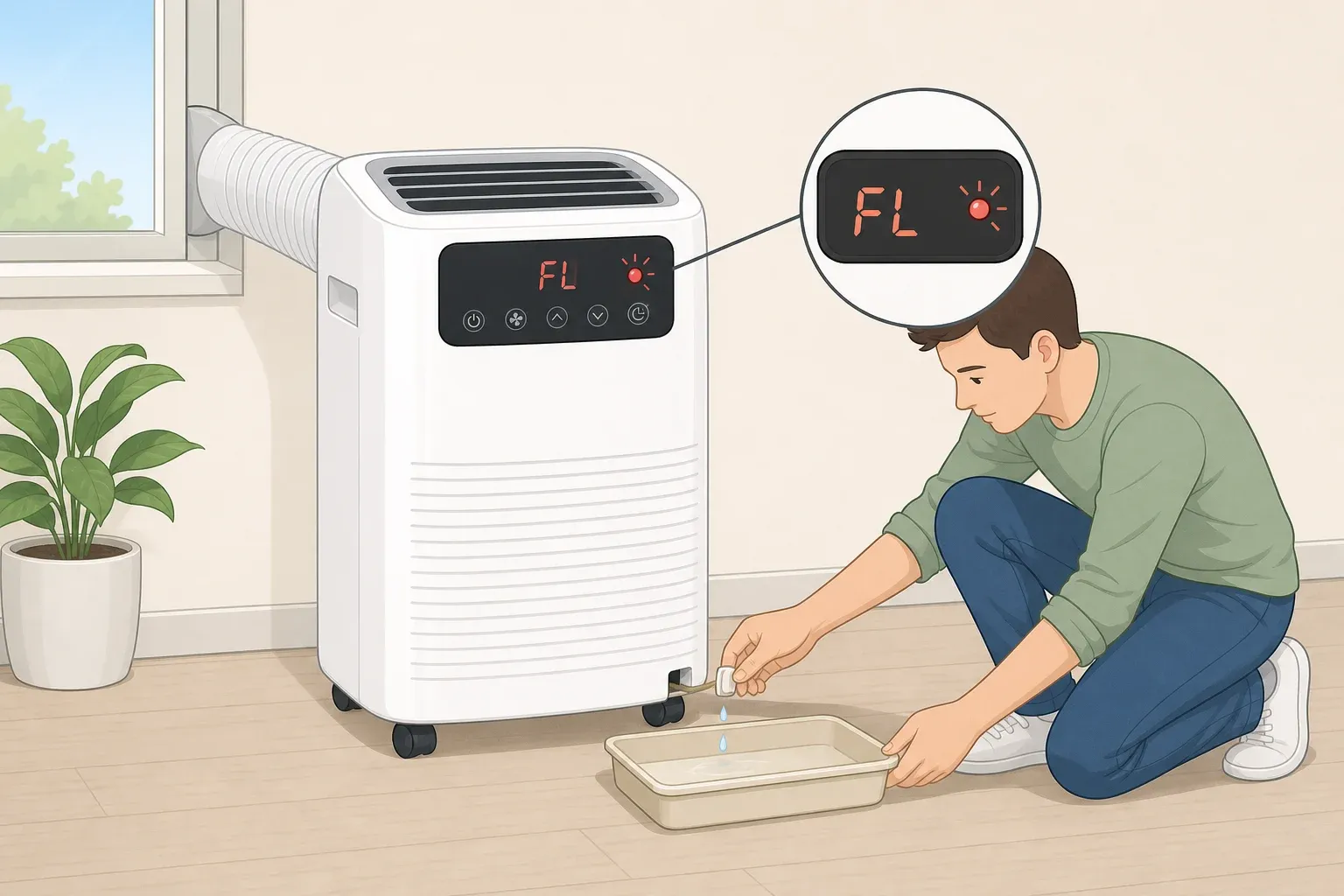
If your portable air conditioner just shut off and the display is blinking FL, don't panic and don't call a repair tech yet. On many models, FL simply means the internal water container has filled up, and the unit has paused cooling until someone empties it. That's the short answer to what FL means on a portable air conditioner: it's a full-tank warning, not a sign the compressor is dying.
The details vary a bit by brand, but the underlying cause is the same everywhere. On LG units, the FL code specifically means the internal condensate tank is full, and the unit shuts off cooling to protect the base pan from overflowing. Other manufacturers flag the same condition under different names, and the next section walks through why the codes look different even though the fix is nearly identical.
Because the exact drain location, tilt rules, and reset timing differ from model to model, treat everything below as a general starting point. Your owner's manual is the final word for your specific unit. This guide covers what the code means, how to drain a portable air conditioner when it pops up, how to reset it, and what to do if FL keeps coming back even after you've emptied the tank.
What does the FL error code mean on a portable air conditioner?
Many manufacturers use FL to mean "full," and the reasoning is straightforward: the appliance has a small internal reservoir that collects condensation pulled out of the air, and once that reservoir fills, something inside needs to know about it so the unit doesn't leak water onto the floor. Code Fix Guide describes FL and P1 as two codes that both point to a full water tank, just triggered by different components depending on the model.
On LG portables, that "something" is a small plastic float that rides on top of the water in the pan. When the water rises far enough, the float trips a switch that tells the control board to stop cooling. On LG units, FL and a related code called CH04 refer to the exact same full-tank fault, so seeing either one means the same fix applies.
Frigidaire uses a different code entirely for the same idea. Its official support page explains that P1 means the bottom tray is full, which is what stops cooling on those units. Code Fix Guide breaks down why the display names differ: FL is usually triggered by an electronic water-level sensor near the top of the tank, while P1 comes from a mechanical float switch closer to the bottom. When the tank is genuinely full, both sensors can trip at once, which is why a handful of displays show FL and P1 together instead of just one code.
The good news is that a full-water code generally calls for draining first, not refrigerant service. This isn't the compressor failing or refrigerant leaking out. It's the unit doing exactly what it's designed to do when its internal bucket is full.
How to drain a portable air conditioner when FL appears
Before touching anything, check your manual for the exact drain plug location and any brand-specific handling instructions, since ports and access panels aren't in the same spot on every model. What follows is the typical process described across manufacturer sources, and it's a reasonable starting point if your manual isn't handy.
What you'll need:
A shallow pan or a couple of old towels
Access to the unit's lower drain plug on the back panel
A level spot to set the unit while it drains
Safety note before you start: Don't tilt or tip the unit to speed up draining unless your specific manual tells you to. Laying a portable AC on its side shifts compressor oil into places it doesn't belong, and running the unit before that oil settles back can damage the compressor. That said, Frigidaire's instructions note that some models may need to be tilted or angled slightly for the water to drain fully. Check your manual before deciding which rule applies to your unit.
Here's the sequence:
Unplug the unit. Don't work near the drain plug while it's powered.
Find the lower drain port on the back panel and set your shallow pan or towels underneath it. This is the process Remove and Replace outlines for LG units.
Remove the plug and let the water run out completely. Frigidaire's support page describes a nearly identical step for its P1 code: move the unit to a drain-friendly spot, pull the bottom plug, and let it empty.
Reseat the plug firmly, plug the unit back in, and restart it in Cool mode.
You'll know it worked when water stops dripping from the port and the unit powers on without immediately flashing FL again. On models that reset automatically after draining, like LG's, the code should clear on that first restart.
If you had to tip or move the unit at all, say hauling it up a flight of stairs or relocating it between rooms, let it stand upright for around 12 hours before plugging it back in, based on the same LG-focused guidance. That waiting period isn't confirmed across every brand, so if your manual gives a different number, follow that instead.
How to reset an LG portable air conditioner FL code (and other brands)
There's no secret button sequence hiding in the manual. On LG units, draining the tank and cycling the power is the entire fix, and unplugging the unit for roughly 60 seconds lets the control board fully reset before you plug it back in and press power. Frigidaire's own support page recommends unplugging for up to 30 seconds to clear a P1 code, which is close enough that either timing should work fine if you're unsure which one applies to your model.
One thing worth knowing before you assume something's broken: if this is the first time you've powered up the unit this season, the tray may simply already be full. Drain it the same way you would any other time and move on.
On LG units, draining and power-cycling clears the code once the float drops back into place. That covers the vast majority of first-time FL alerts. What's trickier is when the code refuses to stay cleared, which is worth walking through separately.
Why does FL keep coming back or show up when the tank looks empty?
A few things can make FL reappear even after a clean drain and restart, and they don't all point to the same problem.
Humidity outpacing the system. LG portables collect condensate in a shallow pan at the bottom of the cabinet, and in a humid room that pan can fill faster than the evaporator can flash the water back out through the exhaust. If you're draining more often during a hot, humid stretch, that's the system working as designed, not a fault.
A false full reading. On LG models specifically, mineral scale or slime buildup can jam the float so it reports "full" even when the pan is bone dry. This is a model-specific issue, and it's not something to chase by opening the unit unless your manual walks you through it.
An uneven surface. A unit sitting on a bowed floor, a sloped patio slab, or thick carpet can push condensate to one corner of the pan, tripping the float early even though the overall water level is low. Setting a torpedo level across the top of the cabinet takes a few seconds and rules this out immediately.
A stuck float or failed switch. If FL returns within seconds of restarting, before the unit could plausibly have produced any new condensate, that's a sign of a stuck float or a bad switch rather than an actual full tank. Code Fix Guide notes that a code returning within minutes often points to a stuck float or a tilted unit. Before assuming a part has failed, run through the basics: confirm the level with a torpedo level on top of the cabinet, make sure the pan actually drained all the way, and check underneath the tank for pooled water that didn't fully clear.
If those checks come back clean and the code still returns immediately, that's the point to stop troubleshooting on your own. Opening the rear panel, handling the float switch, or working with wiring inside the unit goes beyond an ordinary homeowner check, and it's not something to attempt without model-specific instructions from your manual or the manufacturer.
For context, a replacement float switch assembly for most LG portable units runs around $20 to $40 once matched to the exact model number, while a service call just to diagnose the problem often starts at $90 to $150 before labor. That price gap is why some repair guides describe the swap as a low-risk DIY job for anyone already comfortable removing the rear panel, but sourcing the correct part and installing it safely still depends entirely on your model. If you're not confident matching the part or opening the panel, contact the manufacturer's support line or a qualified technician instead of guessing further.
Preventing repeat FL alerts
Once you've drained the tank, reseated the plug, and power-cycled the unit, FL should clear and stay cleared under normal conditions. That covers most cases without any further troubleshooting.
A couple of habits can cut down on how often the code shows up in the first place. Running the unit in fan-only mode for about 20 minutes at the end of a hot day, if your model supports it, dries out the coil and pan instead of leaving standing water overnight, which is exactly the kind of moisture that grows the buildup capable of jamming a float switch. Twice each cooling season, pulling the drain plug and flushing the pan with a cup of half vinegar, half water helps break down the mineral scale and slime that can jam the float in the first place.
It's also worth checking that the unit is sitting level about once a month if it lives on carpet, since even a slight tilt can start tripping the float prematurely.
During a stretch of especially humid weather, some models may need more frequent draining than usual, and that's not something to worry about. What is worth paying attention to is a code that returns immediately, every time, right after a full drain and a level check. That pattern points to a stuck float or a failed switch rather than normal operation, and it's the signal to check your model's manual for next steps or reach out to manufacturer support instead of repeating the same drain-and-restart cycle over and over.




Comments
Be the first, drop a comment!