



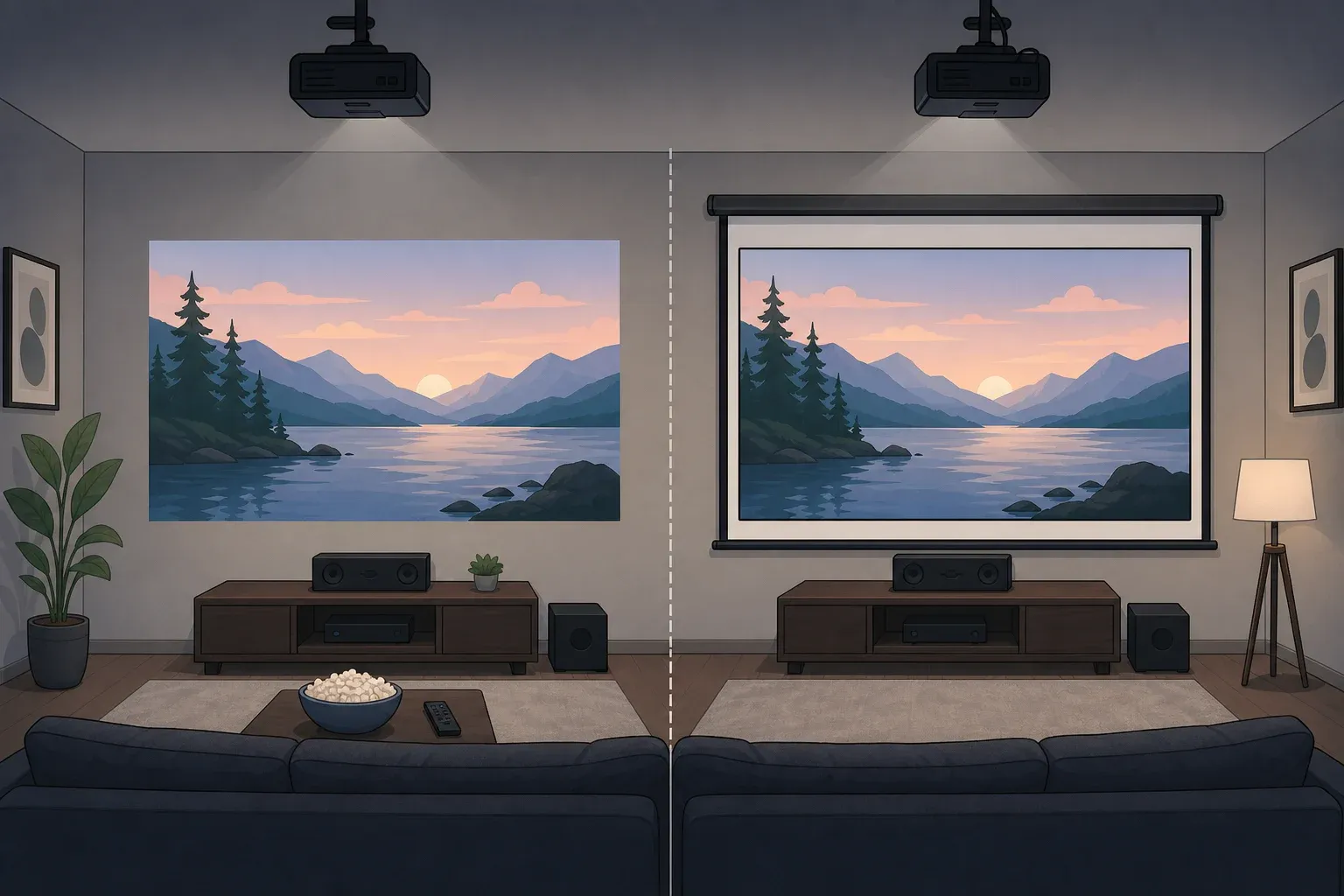
A projector screen isn't a must-have for a home theater. Whether you actually need a home theater projector screen comes down to three things: how dark your room gets at night, what kind of projector you're running, and whether your wall is flat enough to hold up a picture without distortion.
Here's the simplest way to think about it: a projected image is just light bouncing off a surface, so that surface matters almost as much as the projector itself. That's really the whole "do you need a projector screen for a home theater" question in miniature: a projector is only half of a two-piece system, and the wall or screen on the other end decides how good that light ends up looking. Unlike a television, which generates its own light and needs nothing else to look right, a projector depends entirely on what it's projecting onto.
A smooth matte-white wall can be a legitimate starting point for a standard-throw 4K projector, provided the room goes fully dark at night. But even a little leftover light changes the math: a screen becomes necessary once ambient light is present in the room, because it preserves contrast in a way a painted wall simply can't.
The rest of this guide walks through when a wall is genuinely fine, when a dedicated screen earns its cost, how to check your own room before spending anything, and how the DIY painted-screen middle ground stacks up against both.
Do you need a projector screen for a home theater, or can you use a wall?
This is the first practical decision point, and it isn't really a gear question. It's a room question: can you get the space fully dark, and what type of projector is pointed at the wall?
Room light is the single biggest variable. In a controlled-dark setup with blackout curtains and no overhead lights, a plain white wall delivers acceptable 4K image quality. The moment the room only gets partly dark, the calculation changes, and it's worth being specific about how much.
HomeCineSolutions draws a line here: a standard tensioned matte-white screen is enough for a room that can be partly darkened, shutters closed and curtains drawn, but an ambient-light-rejecting (ALR) screen becomes necessary once daylight or a lamp stays on during viewing. In other words, some ambient light doesn't automatically mean you need the fanciest screen material on the market, just a screen instead of no screen.
Projector type matters as much as the light in the room. Standard-throw projectors, the kind mounted on a ceiling or shelf several feet back from the wall, tolerate a decent wall reasonably well. Ultra-short-throw (UST) projectors are a different story: they sit just 17 to 45 centimeters from the wall and fire light upward at a steep angle, and geometry turns small wall imperfections into wavy, distorted images. A flat, well-painted wall can still technically work with a UST projector, but for UST models, pair the projector with a UST-compatible ALR screen sized for that projection angle, since ordinary screens and floor screens aren't built for it.
One more limit worth knowing before you shop for anything: no screen fixes direct sunlight. XGIMI is blunt about this, stating that no projector-and-screen combination overcomes direct sunlight hitting the surface without a structural fix, like blackout shades over a window.
So before comparing screen prices or gain numbers, answer two questions honestly: can this room go fully dark or close to it, and is the projector a standard-throw model or a UST unit? Those two answers point toward a wall, a standard screen, or an ALR screen, well before a single spec sheet gets involved.
Projector screen vs. white wall: image quality differences
Once darkness is sorted out, the next question is how much difference a real screen actually makes versus paint. That comes down to a measurement called gain, which describes how much light a surface reflects back to your eyes compared with a reference standard. A flat magnesium carbonate panel serves as the industry's 1.0 baseline: a surface at 1.0 gain reflects the same light back as that panel, a higher number reflects more, and a lower number reflects less.
Reported wall gain varies depending on who's measuring and what paint is on the wall, which is part of why "just use a white wall" isn't a single, fixed recommendation. XGIMI puts typical wall paint at 0.5 gain or below, while a standard matte-white projector screen sits between 0.8 and 1.0. HomeCineSolutions lands a bit higher on wall paint, estimating standard matte-white walls at 0.7 to 0.9, and adds that a dedicated matte-white screen typically reaches 1.0 to 1.3. The exact numbers shift depending on who tested what, but both sources agree on the direction: a paint job structurally caps out lower than a purpose-built screen.
Resolution changes what you can get away with. XGIMI reports that wall texture irregularities as small as 0.5 to 2 millimeters can scatter light and create micro-shadows on a 4K image, something that's largely invisible at 1080p because the wider pixel pitch hides those flaws. A slightly bumpy wall that looked fine with an older 1080p projector can look soft and speckled the moment it's paired with a 4K one.
Paint sheen changes the picture, not just the color. XGIMI recommends staying below 5 gloss units on the ASTM D523 gloss scale, since eggshell or semi-gloss finishes create uneven brightness or a visible hotspot that moves as you shift where you're sitting. Matte or flat finishes diffuse light more evenly and avoid that problem entirely.
A wall can look good under the right conditions, but only a specific kind of wall does it: smooth, neutral matte white, low-gloss, and free of texture. That's a narrower target than most people assume when they decide to skip buying a screen.
Check your room in 10 minutes
Before deciding between a wall, a paint job, or a home theater projector screen, run a short test in the actual room. It takes less time than reading a spec sheet.
Project a test image at the size you'd actually want to watch, not a small demo window.
Set the room exactly the way it will be during normal viewing, curtains and lights included, not the best-case scenario with everything dimmed for a demo.
Look closely for visible wall texture, ripples, a moving sheen hotspot as you shift seats, and any outlets, switches, or shelves inside the image area.
Note whether the projector is standard-throw or UST, since that changes which screen type actually fixes what you're seeing.
Pick a lane based on what shows up: an untouched wall if the picture already looks clean, a painted wall if the surface just needs flattening and tinting, a matte-white screen for a partly darkened room, or a UST/ALR screen if lights stay on or the projector sits close to the wall.
Whatever shows up in this test matters more than any spec on a box. A wall that looks fine under a dim lamp can fall apart once the overhead light comes on, and that's exactly the condition worth testing for.
How to choose projector screen gain for your room
If a wall doesn't clear that bar, or better performance is the goal, the next decision is what gain to buy, and that's a trade-off, not a "bigger number is better" situation. Higher gain brightens the image but narrows the usable seating area. HomeCineSolutions notes that a gain of 1.5 sends about 50% more light toward the center of the room, but it can create a visible hot spot and shrink the viewing angle for anyone sitting off to the side.
Lower gain suits dark, dedicated rooms better than that trade-off might suggest. HomeCineSolutions points out that a gain of 1.0 reflects the same amount of light as the industry's reference panel and keeps a wide, even viewing angle, while pushing gain higher sacrifices that evenness for extra brightness at the center. In a room that actually goes dark, that even spread usually matters more than raw brightness.
Ambient-light-rejecting (ALR) screens solve a different problem than gain alone. These use a gray, high-contrast surface designed to reject light coming in from the sides while still reflecting the projector's own light forward toward the seating area. HomeCineSolutions puts the typical viewing angle on these screens at 140 to 180 degrees, wide enough that a full couch of viewers still gets a uniform picture rather than just the person sitting dead center, and recommends pairing one with a projector rated at least 1,300 to 2,500 ANSI lumens depending on the gain chosen. XGIMI's own UST ALR screen, built for its ultra-short-throw projectors, is rated to reject 80% of ambient light while adding a 1.4x brightness gain, though XGIMI notes those figures are measured under controlled conditions and real-world results shift with ceiling light placement and where you're sitting.
Gain choices only mean something once they're matched to an actual room, so size matters too. HomeCineSolutions notes that a diagonal of 100 to 120 inches suits most living rooms, provided the viewing distance sits somewhere between 1.5 and 2.5 times the image width.
Before buying anything, match screen gain and size to two things: the projector's lumen output and the room's worst-case ambient light, not the best-case scenario when the shades happen to be perfectly drawn. A screen sized and tuned for the wrong conditions underperforms no matter how good the material looks on paper.
Painted projector screen wall: is DIY worth it?
There's a middle ground between "just use the wall as-is" and buying a dedicated screen: paint formulated specifically for projection. HomeCineSolutions lists coatings like Smart Projector Paint, Screen Goo, and barium sulfate-based paints as that middle path, and reports they can reach a gain close to 1.0 or even higher, giving you a large projection surface without the bulk or cost of a framed screen.
The catch is that surface prep matters more than the paint itself. The same texture problems covered above apply just as much to a painted DIY screen as to an untouched wall: fill cracks and gouges first, then sand the wall as flat as you can get it before rolling on anything. Skip that step and every flaw still shows up once the room switches to 4K content.
Budget accordingly. HomeCineSolutions estimates specialty screen paint runs about €80 to €200 to cover 5 to 10 square meters of usable wall, on top of primer, rollers, and the time it takes to prep the surface properly. Some people get solid results using a very high-quality standard white acrylic paint instead of a dedicated screen coating, but even HomeCineSolutions is careful to note the result still falls short of a proper technical screen. It's a reasonable fit for occasional viewing in a room that goes completely dark, not a full swap for a purpose-built surface.
Space is the detail people skip and then regret. Whatever wall gets picked needs to stay completely clear of outlets, switches, shelves, and decor for the full size of the image, which rules out a lot of walls that look open at a glance but actually have a light switch or thermostat sitting right where the picture needs to go.
Done properly, a painted wall can land close to an entry-level screen for a lot less money, which is the whole appeal of the DIY route. But if the wall has heavy texture, a popcorn-style finish, or simply can't be fully cleared and sanded flat, stop and go with a fabric screen instead, tensioned or ALR depending on how much light the room gets.
What to check before you buy anything
Test the room at night with the lights and curtains set exactly the way they'll be during real viewing, not the best-case scenario. Match projector lumens and screen gain to that worst realistic condition, not to how the room looks on a rare, fully-dark evening.
If watching happens weekly rather than occasionally in a dedicated room, HomeCineSolutions notes a tensioned fixed-frame screen remains the more cost-effective investment over a decade, compared with repeated wall touch-ups or repainting a DIY screen that's started to show wear.
Know when to stop adjusting, too. If a properly prepped, flat matte-white wall in a genuinely dark room still looks soft or dull after checking basic projector focus and placement, the limitation is the wall's texture or paint sheen, not something more calibration will fix. If the night test from earlier turned up gray blacks, a moving hotspot, or visible wall texture, stop tweaking projector settings and start pricing a screen matched to the projector type sitting in that room.




Comments
Be the first, drop a comment!